Feature settings
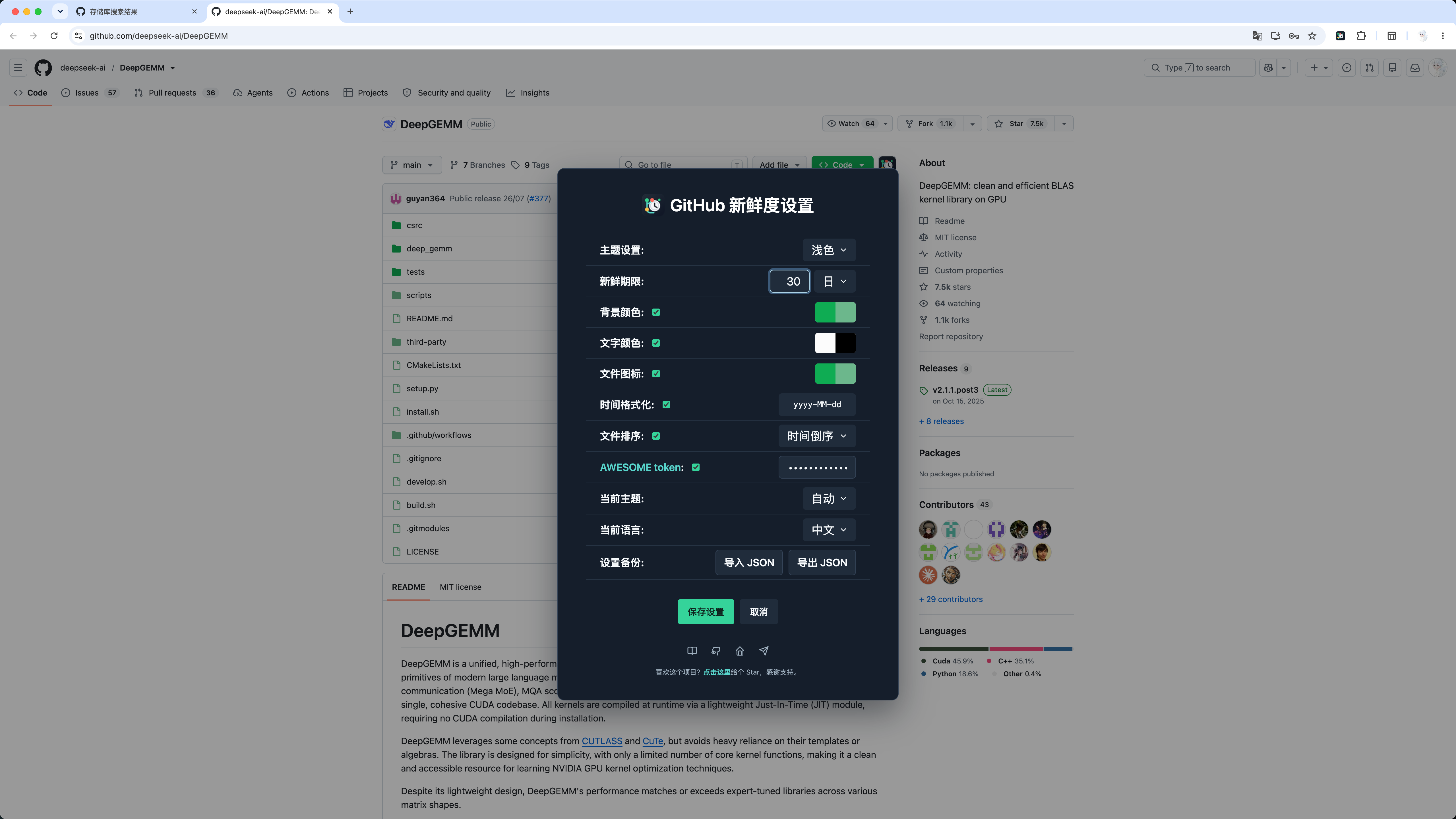
GitHub Freshness compares each repository or file update time with your configured freshness period. Items updated within that period are treated as fresh; older items are treated as stale.
Open the settings panel
On repository pages, click the GitHub Freshness icon after the Code button. On search pages, use the icon in the sorting controls. The Chrome extension can also open settings from the browser toolbar, while the userscript provides a command in the userscript manager menu.
Theme
Choose which theme configuration you are editing:
- Light
- Dark
The option labels follow the selected interface language. Saving writes the current colors, freshness period, and switches to the selected theme.
Freshness period
Controls how long a repository or file remains fresh after an update. For example, 22 days means updates within the last 22 days use the fresh colors.
Supported units:
- Day
- Week
- Month
- Year
Color settings
Background color, Text color, and File icons each have two color swatches:
- The left swatch is used for items inside the freshness period.
- The right swatch is used for items outside the freshness period.
- Hovering a swatch shows Fresh color or Stale color.
Date formatting
When enabled, converts GitHub update times to yyyy-MM-dd. The format currently in use, yyyy-MM-dd, is shown on the right side of the settings row.
File sorting
Sort repository files and folders by update time in ascending or descending order.
Current theme
Choose the active theme behavior:
- Auto: follow the system light/dark preference.
- Light: use the light theme configuration.
- Dark: use the dark theme configuration.
Current language
Choose the language used by the settings panel, menu, and dialogs:
- Auto: follow the GitHub page language first, then the browser language.
- Chinese: force Chinese.
- English: force English.
Changing the language immediately previews the panel title, labels, options, buttons, and hints. The preference is written only after clicking Save settings; Cancel discards the language change. Previewing a language does not clear unsaved colors, freshness periods, switches, or the token.
Both the extension and userscript support update-time parsing on Chinese and English GitHub search pages.
Settings panel appearance
The panel uses the “Midnight Mint” palette derived from the branch-clock icon: a deep navy panel, dark controls, mint primary actions, cyan links, and amber warning states. Its desktop width stays between 550 and 600px, while mobile layouts shrink to the available space. The bottom area includes icon links to the documentation, GitHub repository, personal homepage, and Telegram community, followed by a subtle Star reminder as the final panel content. This palette affects only the settings interface and does not change repository highlight colors configured by the user.
Settings backup
Click Export JSON to back up themes, colors, freshness periods, sorting, and language preferences. Click Import JSON to restore them. The page reloads automatically after a successful import.
Exports never include the AWESOME token. Imports also ignore any token field in the backup and preserve the local AWESOME token.
AWESOME token
AWESOME and token are separate links in the settings panel. Hover AWESOME for the caution message and click it to open the feature documentation. Hover token for the token-page hint and click it to open GitHub Tokens.
This setting appears after File sorting and before Current theme. After settings are saved successfully, the current page reloads automatically to apply them.